View Registered Users in the ARM
The Registered Users page lets operators view the SBC registered users that were added to the ARM as shown in Add Registered Users to the ARM. After SBC registered users are added to the ARM, the ARM will be capable of performing call routing based on SBC user registrations. When defining a Routing Rule, operators will be able to route calls to SBC registered users (see Add a Routing Rule). The destination to which to route the call will depend on where - which SBC - the user performed the registration. In the Routing Rule definition, operators will select the appropriate routing condition, namely, that the call destination is an SBC registered user.
| ➢ | To view SBC registered users added to the ARM: |
| 1. | After adding SBC registered users to the ARM, open the Registered Users page (Users > Registered Users). |

| 2. | Click the refresh icon  |
| 3. | Use the following table as reference: |
|
Column |
Explanation |
|---|---|
|
User |
Displays the SBC registration number of the user. |
|
Host |
Displays the IP address of the Node (SBC) in which the user was registered. Each Node (SBC) has its own registered users. |
|
Node |
Displays the name of the Node (SBC) in which the user was registered. |
|
Peer Connections |
Displays the name of the Peer Connection in which the user was registered. |
| ➢ | To view registered users from a specific Node or Peer Connection: |
| ■ | In the Registered Users page, click the Advanced Search icon. |
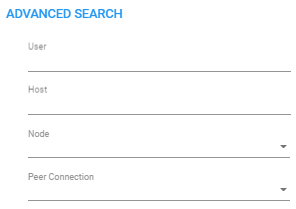
| ● | From the 'Node' drop-down, select a specific node (SBC / Gateway) to view only registered users associated with that node. |
| ● | From the 'Peer Connection' drop-down, select a Peer Connection (IP Group) to view only registered users associated with that Peer Connection. |
The feature facilitates quick access to information by excluding unwanted information from the page.